

PeterPaul already showed us in his blog how to install a new wls server in the image and install the Oracle Service Bus in the new server.
In my blog i will use the wls of the SOA Suite and extend the domain with the Oracle Service Bus application.
Install OEPE
In the WebLogic home of the SOA Suite there isn’t an OEPE installed.
This will be needed for the OSB installation.
Download oepe-galileo-all-in-one-11.1.1.6.0.201007221355-linux-gtk.zip
Connect to the vm box as ‘oracle’ user and create a dir in the fusion middlware home
[sourcecode language=”xml”]
cd /oracle/fmwhome
mkdir oepe-galileo-all-in-one-11.1.1.6.0
[/sourcecode]
Unzip the oepe zip in this directory
[sourcecode language=”xml”]
cd oepe-galileo-all-in-one-11.1.1.6.0
unzip /oracle/tmp/oepe-galileo-all-in-one-11.1.1.6.0.201007221355-linux-gtk.zip
[/sourcecode]
Installation of the oepe in the weblogic home is done.
Oracle Service Bus
Download ofm_osb_generic_11.1.1.3.0_disk1_1of1.zip
Unzip the file and run the installer.
By default the middleware home which is selected at step1 is : /home/oracle/bea_default

Change this location to
[sourcecode language=”xml”]
/oracle/fmwhome
[/sourcecode]

Now the installer will also see the correct location of the OEPE home.
Next, next and we’re done.
Extend Domain
Start the configuration wizard
[sourcecode language=”xml”]
/oracle/fmwhome/oracle_common/common/bin and start config.sh
[/sourcecode]
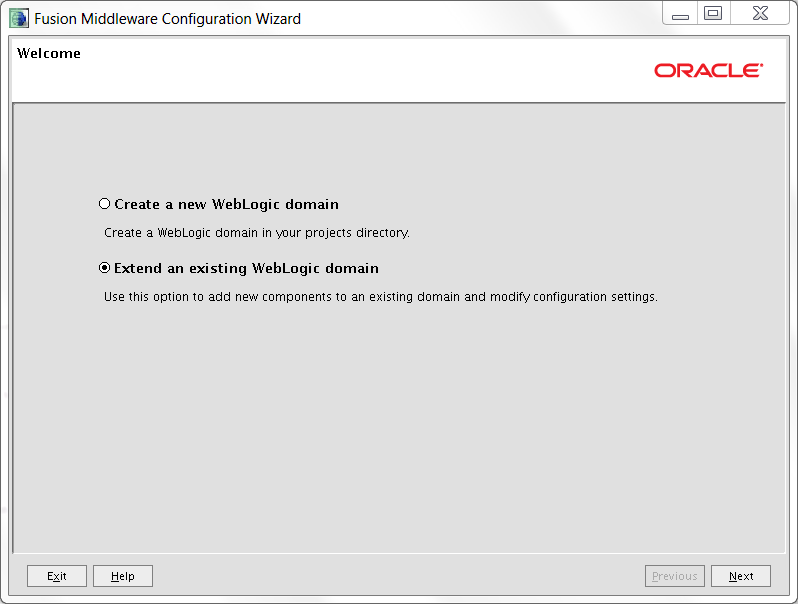
Choose to extend and existing Weblogic domain
Browse to the domain1 directory

Select the OSB components to include in the domain
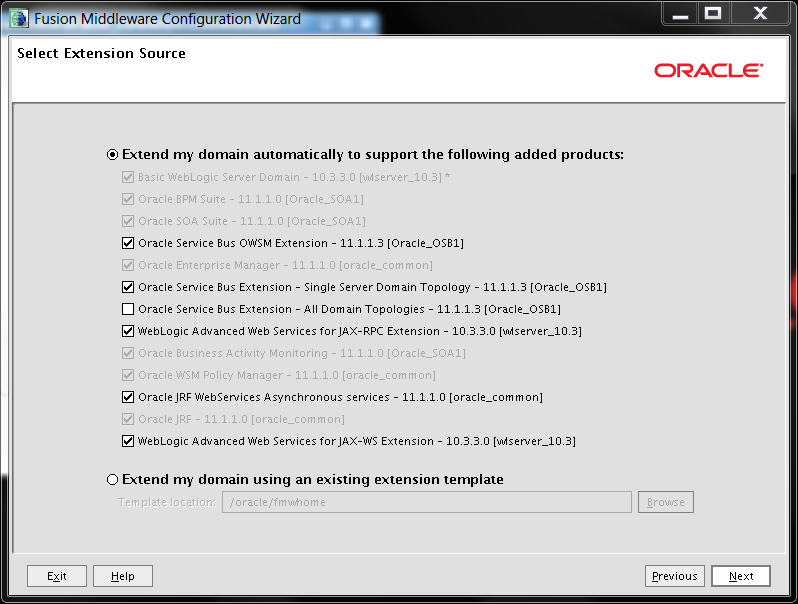
When testing the db connection for the OSB JMS Reporting Provider use the xe connectstring.
Default password for all db schemas (soa_infra etc) is : welcome1


Start the server again by use of the ´Start/Stop WebLogic Server´ icon on the desktop.
Check the console urls to see if everything is still working
- http://localhost:7001/em
- http://localhost:7001/console
- http://localhost:7001/sbconsole
Eclipse
When you try to start Eclipse from the virtual box itself without parameters it will give some warning like
[sourcecode language=”xml”]
GC Warning: Repeated allocation of very large block (appr. size 638976):
May lead to memory leak and poor performance.
[/sourcecode]
Use : ./eclipse -vm /oracle/fmwhome/jdk160_18/bin/java
Updated
The first version of the blog showed steps on how to extend the domain so the osb server would run in his own managed server (All Domain topolgies)
On deployment of a composite it would fail with the next error
[sourcecode language=”xml”]
Caused By: oracle.fabric.common.FabricDeploymentException: Unable to register service. {rootCauses=[]}
[/sourcecode]
Lateron i will try to investigate this error. For now i updated the blog to make use of the ‘Single Server Domain Topology’, and now deployment of the composite still works and i can add resources in the OSB Console.


11 Responses to “Extend Pre-built Virtual Machine for SOA Suite with Oracle Service Bus”
Eric,
Any special reason why you use the Galileo edition and not the Helios? I’m asking because I’ve not been able to get the Helios edition working.
Regards,
Robert
When you unpack the helios edition in the wls home directory and run the osb installer it won’t see a ‘valid’ oepe home even when you browse to that helios unpacked dir. So i could either spend time in fixing this or unpack the galileo version and go on with the install.
It should be possible to use the helios version, but then i need to check all the metadata files to see where it checks currently installed versions.
Mischa made a post on how to upgrade the oepe to the helios version, see : http://mischakoelliker.wordpress.com/2010/08/31/oracle-service-bus-upgrade-to-oepe-11-1-1-6/
ofm_osb_generic_11.1.1.3.0_disk1_1of1.zip can be found at http://blog.iaskengineer.com/alexlui/entry/download_links_for_old_oracle
When selecting OSB components start selecting bottum up. Otherwise I got error CFGFWK-64060.
When I use the above link for ofm_osb_generic_11.1.1.3.0_disk1_1of1.zip I get Unauthorised request. Any ideas.
Oracle removes the downloads when newer versions come out.
You can download a newer version over here : http://www.oracle.com/technetwork/middleware/service-bus/downloads/index.html
or did you ment the link mentioned in the comment above your comment?
[…] extended for example with Oracle OSB as described in installing OSB on SOA Suite 11g appliance and extend SOA Suite appliance with Oracle Service Bus. The latter showing you how to extend the SOA domain and the first how to install OSB in a seperate […]
[…] http://www.xenta.nl/blog/2010/12/05/extend-pre-built-virtual-machine-for-soa-suite-with-oracle-servi… […]
little bit old post, but maybe still usable :).
I am trying to get OEPE working with (a newer version) of the pre-built VM (http://www.oracle.com/technetwork/middleware/soasuite/learnmore/vmsoa-172279.html).
When running OSB installation wizzard, OEPE is not recognized. The OEPE location field is not even showed on the installation form..
I make use of the following versions:
– oepe-indigo-all-in-one-11.1.1.8.0
– ofm_osb_generic_11.1.1.7.0_disk1_1of1
Do you have any clue?
Thanks.
you try to update the oepe version inside the vmware with a newer one, correct?
No, sorry. Nothing of the OEPE is present in this version of the vmware. According the readme it’s due to licensing restrictions..
My goal is to work with Eclipse (and the OSB wizzards) using this vmware.
Do you know if it is possible to install it?
Derk – I have the same problem as well. The vm image includes SOA, OSB. However, there is no OEPE. I downloaded the all-in-one 64 bit linux of OEPE and unzipped this is FMWHOME. When I double click on eclipse, I do not see OSB perspectives. What am I missing?
In this scenario, OSB is installed as part of the image before OEPE.